Short answer: choose Ableton Live when you want a track-and-clip workflow, fast audio warping, a direct path from Session View experiments to Arrangement View, or tight Push integration. Choose FL Studio when the Channel Rack, reusable patterns and Piano Roll match the way you build beats and melodies. For vocal or instrument recording, compare Live with FL Studio Producer or higher; Fruity Edition does not record audio directly.
This comparison was checked on September 21, 2026 against the official release notes and manuals for Live 12.4.6 and FL Studio 26.1.6. It is a buying and switching guide, not a lab benchmark. The five-job exercise below compares the same work in both trials without pretending that one timed score applies to every producer.
| If you care most about… | Start with | Why |
|---|---|---|
| Building beats from reusable patterns | FL Studio | Channel Rack, Step Sequencer, Patterns and Piano Roll make that structure explicit. |
| Recording clips, reshaping audio and arranging on tracks | Ableton Live | Clips, devices, routing and the timeline live in one track model. |
| Improvising with clips, then capturing the performance | Ableton Live | Session View records directly into Arrangement View. |
| Detailed MIDI note editing | Try FL Studio first | Its Piano Roll is a central part of the program, but test the edits you repeat rather than accepting a universal ranking. |
| Direct vocal or instrument recording at the lowest FL tier | Ableton Live Intro | FL Studio requires Producer or higher for direct audio recording. |
| Paying once for future updates to the same edition | FL Studio | Lifetime Free Updates cover the purchased edition; edition upgrades and optional services remain separate. |
| Opening collaborators’ native projects | The DAW they use | FLP and ALS files are not interchangeable native sessions. |
The real difference is the project model
The biggest difference is not genre. It is where musical information lives and how the program connects it.
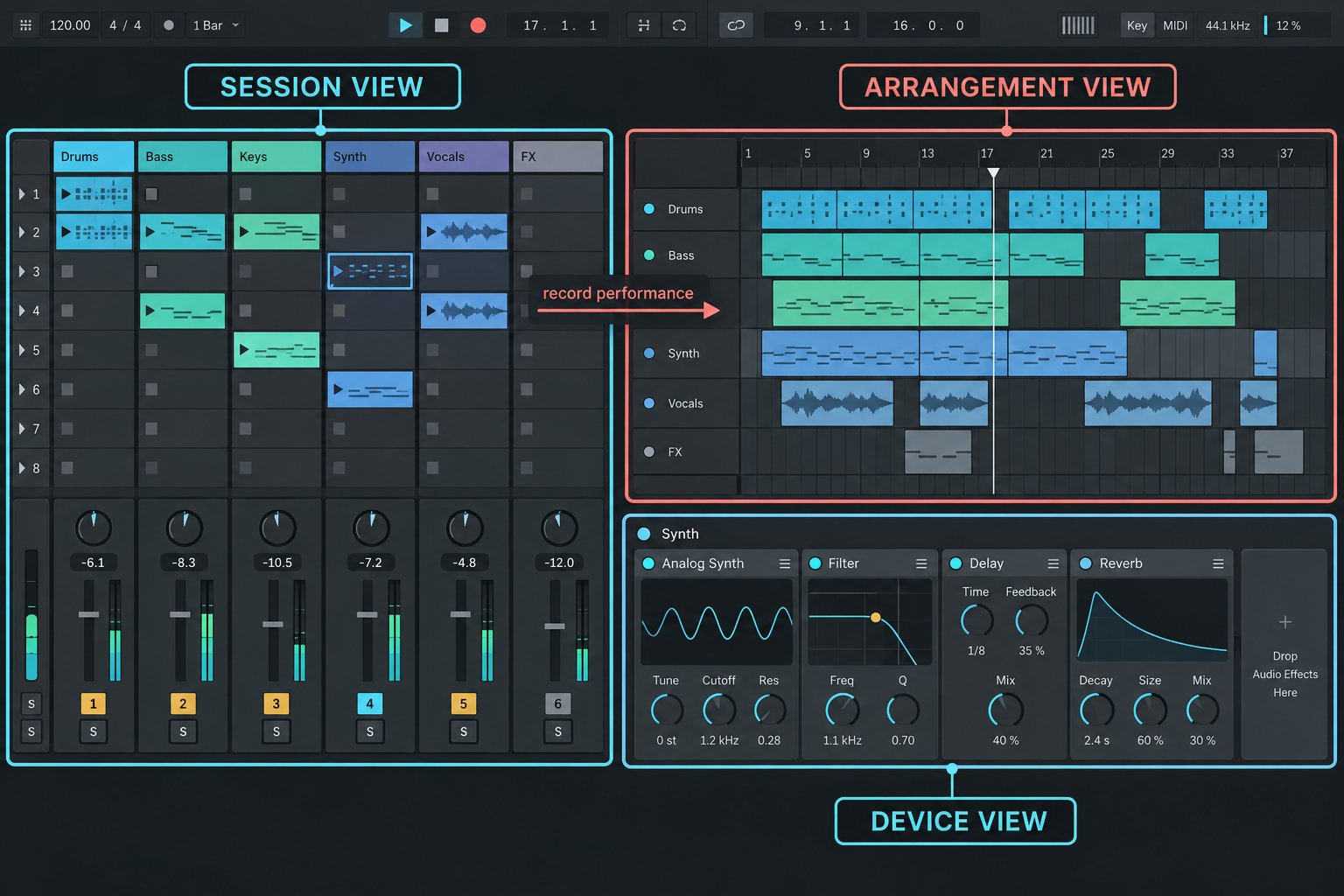
In Ableton Live, a track holds clips and a device chain. Arrangement View places those clips on a timeline. Session View launches clips and scenes without a fixed order, and that performance can be recorded into Arrangement. When you open Device View, you are still working with the selected track.
FL Studio separates several objects. Instruments and samples begin as Channels in the Channel Rack. Patterns hold note and event data. The Playlist arranges Pattern Clips, Audio Clips and Automation Clips. Mixer routing is another relationship. A Playlist lane does not automatically mean “this instrument” or “this Mixer track,” although Instrument Track Mode can link the parts when you want a more conventional track layout.
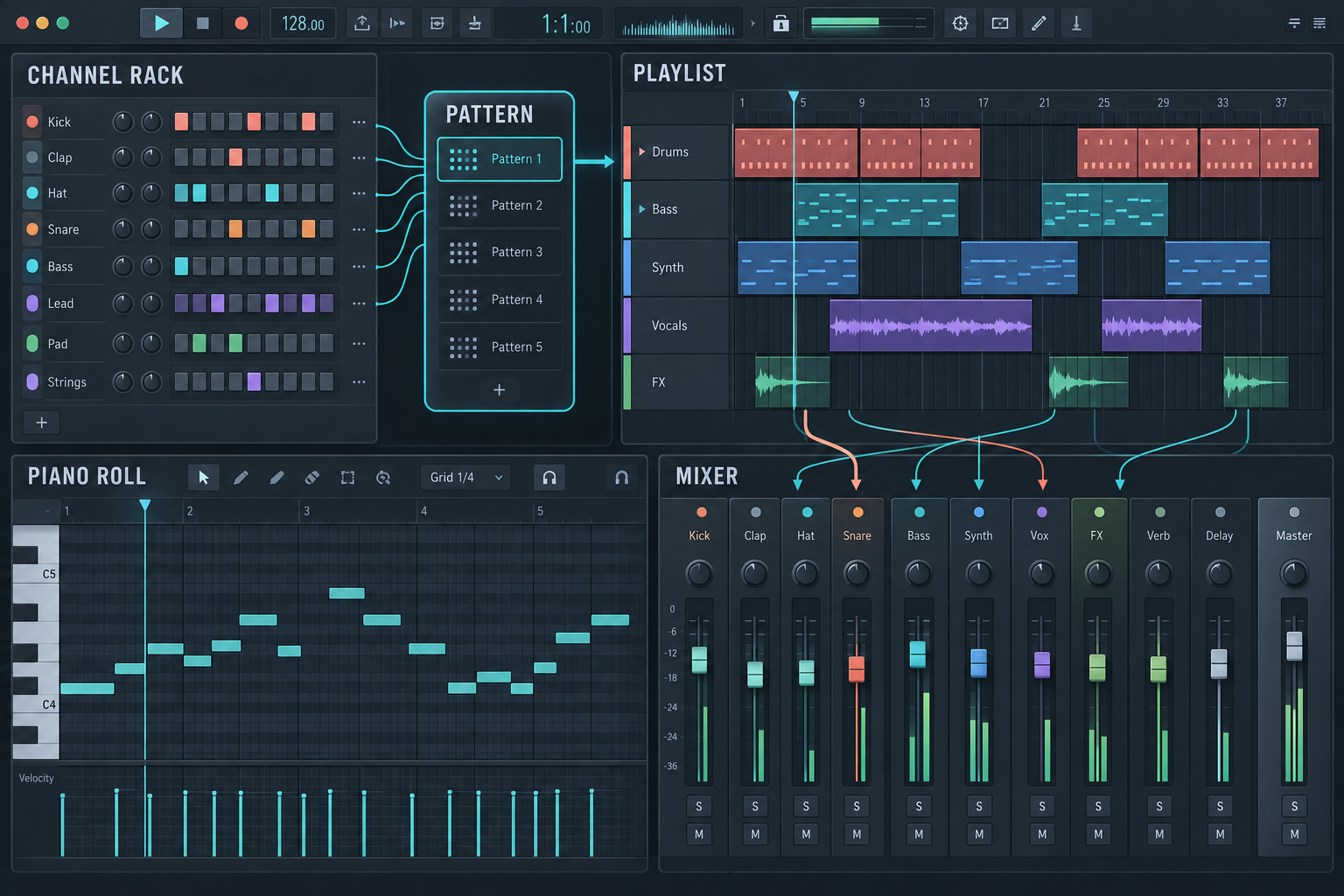
This matters when you duplicate a drum section. In FL Studio, one Pattern can drive several Channel Rack instruments routed to different Mixer tracks. If you want the second copy to contain different notes, you may need to make that Pattern Clip unique. In Live, a MIDI clip belongs to its track; a Drum Rack can still hold and process several sounds inside that track. Neither model is inherently more professional. One of them will usually make your repeated edits easier to predict.
Compare the same five jobs before you buy
Use the same source files and the edition you actually plan to purchase. Do not race a stopwatch on the first attempt. Learning the location of a command is not the same as evaluating the workflow. Instead, note three things after each job:
- Friction: where did you stop because the next object, window or routing destination was unclear?
- Recovery: when you made a mistake, could you identify what changed and undo or repair it confidently?
- Delivery confidence: could you export the stereo mix and separate parts you intended?
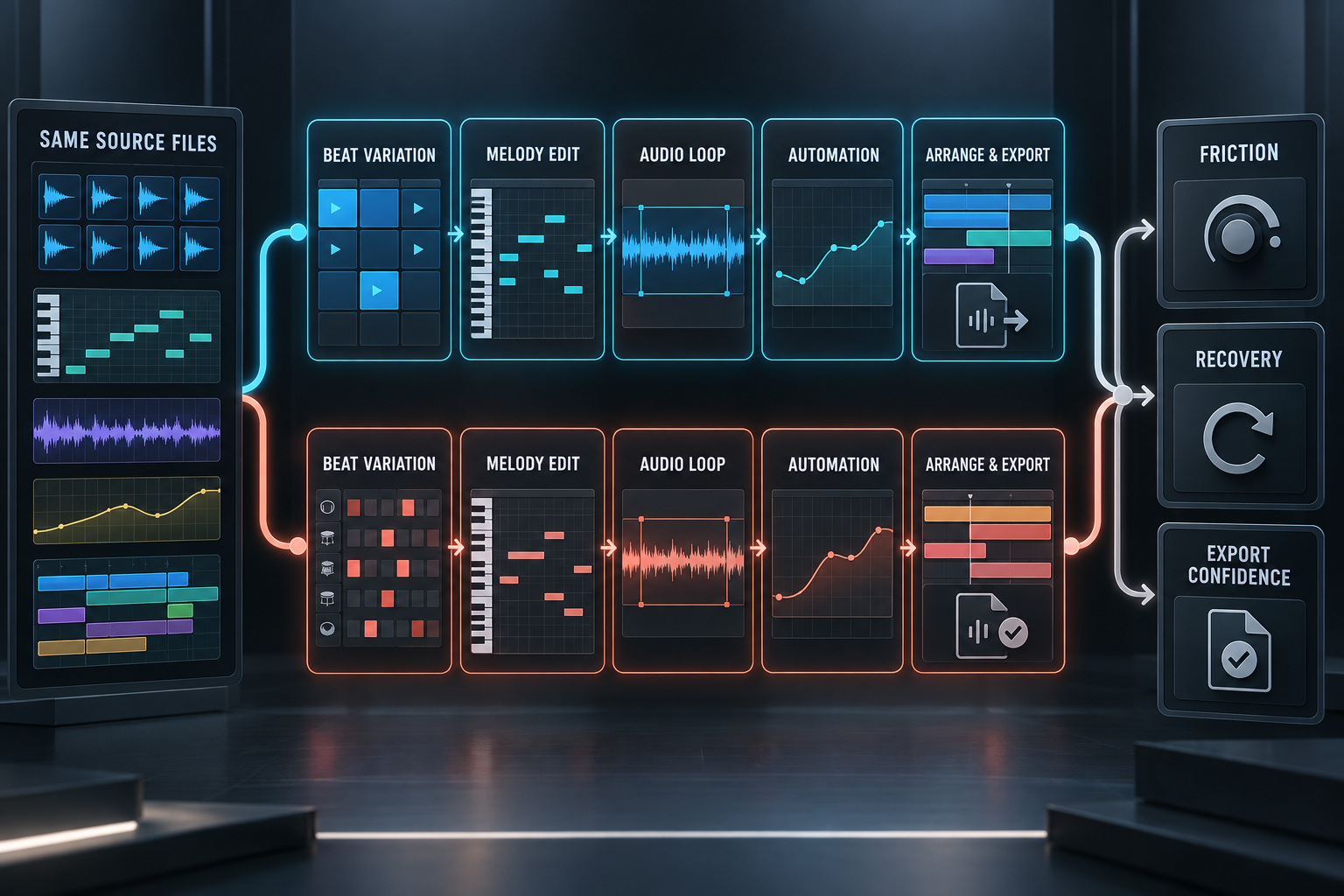
1. Build a beat and create a variation
Load a kick, snare, hat and bass sound. In FL Studio, start with the Step Sequencer or Piano Roll and route at least one Channel to its own Mixer track. In Live, use a MIDI clip and Drum Rack or separate MIDI tracks. Duplicate the idea, then change only the second half.
The useful question is not which DAW reached four bars first. Check whether you understood which copies shared their source, how you separated the kick for processing and how you would create ten controlled variations without changing the wrong object.
2. Edit a melody
Try the note operations you perform every week: select off-grid notes, change velocity, shorten a group, constrain notes to a scale and create a second phrase. FL Studio’s Piano Roll is central to its workflow and includes a broad set of note tools. Live also offers detailed MIDI editing, plus MIDI Transformations and Generators; Max for Live tools add edition-specific options.
“Best Piano Roll” is too vague to settle the purchase. Your answer should come from the edits you repeat and whether the editor keeps you oriented while the phrase becomes more complex.
3. Reshape an audio loop
Import a loop whose tempo differs from the project. In Live, inspect Warp mode, markers and Clip View. In FL Studio, inspect the Audio Clip controls and, if your edition includes it, the dedicated Newtime workflow. Change timing and pitch, then listen to transients and sustained material. A clean result on one drum loop does not prove that one stretching engine wins on vocals, pads and full mixes.
4. Automate a filter and a send
Write one filter move and one send-level move. Copy the section, change the curve and return the parameter to its intended value. In Live, compare Arrangement automation with a Session clip envelope. In FL Studio, create an Automation Clip and confirm which parameter it controls.
Then make a deliberate mistake. Touch the parameter, move the automation or duplicate the wrong clip, and see whether the program makes the conflict understandable. Recovery tells you more about daily use than a clean demonstration.
5. Arrange and export
Create an opening, one change and an ending. Live can begin directly in Arrangement or capture an improvised Session sequence; our Session versus Arrangement guide explains that handoff. In FL Studio, arrange Pattern, Audio and Automation Clips in the Playlist, then verify the Mixer routing before export.
Render a stereo reference and the separate files a collaborator would need. Live can export All Individual Tracks. In FL Studio, Split mixer tracks follows Mixer tracks, not Playlist lanes; Export all Playlist tracks is a separate command. Check the first transient, the tail, insert effects, master processing and silence trimming. Do not send both a bus and all of its parts without labeling them, because the recipient can accidentally double the sound.
Recording and live performance are not genre restrictions
FL Studio can record complete songs in Producer Edition and higher. Fruity Edition allows up to eight Audio Clips but does not include direct audio recording. Importing an existing vocal is not the same as recording a microphone with monitoring and takes, so compare the right edition.
Ableton’s Session View is built into its clip and Arrangement workflow and remains the clearer starting point for many performance sets. FL Studio is not limited to a fixed timeline: its documented Playlist Performance Mode can trigger clips and scenes and record a performance. If live use drives the purchase, test your controller mappings, set navigation, emergency recovery and final audio routing. The label “made for live performance” does not rehearse the show for you.
Genre is an even weaker shortcut. Live can sequence detailed beats in Arrangement. FL Studio can record, edit and mix vocals and instruments in the correct edition. Choose around repeated operations, collaborators and required hardware—not a list of famous users.
Trials and system compatibility
Both programs support current Windows and macOS systems, but the DAW requirement is only the first check. Confirm your audio interface driver, plug-in formats, controller support and any older project dependencies. Ableton publishes current Live system requirements; Image-Line publishes current requirements and builds on the FL Studio download page.
Export before closing the FL Studio trial. The trial can save projects and render audio, but it cannot reopen saved projects until you buy FL Studio. A plug-in outside the purchased edition can also remain in trial mode. Read the trial and plug-in rules before using a restricted tool in a project you expect to reopen. Ableton’s trial has separate terms, covered in our Live trial guide.
Current prices, editions and updates
These were the official US list prices checked on September 21, 2026 in the Ableton shop and on the FL Studio pricing page. Tax, currency, promotions and account-specific upgrade offers can change the checkout total.
| Ableton Live | US list price | FL Studio | US list price |
|---|---|---|---|
| Intro | $99 | Fruity | $99 |
| Standard | $439 | Producer | $179 |
| Suite | $749 | Signature | $269 |
| — | — | All Plugins Edition | $449 |
Price rows do not compare equal bundles. Check the devices, instruments, packs and limits you need in the official Live edition comparison and FL Studio edition comparison. Built-in stem separation is listed for Live Suite and for FL Studio Producer or higher. If recording drives your decision, FL Producer is the relevant entry point.
Image-Line’s Lifetime Free Updates apply to the FL Studio edition you purchased. Moving to a higher edition, separately sold products and optional services remain separate. Ableton sells major versions and edition upgrades under its current offers. The cheaper first checkout and the cheaper ten-year path are different questions; compare the edition you will really use.
CPU and RAM: compare the same workload
There is no dependable universal winner for CPU or memory use. A result changes with the computer, audio driver, interface, buffer, sample rate, plug-in versions, oversampling, routing and musical material. The two DAWs’ own CPU meters also need not represent the same measurement.
If performance matters, use the same machine and audio settings. Rebuild a representative section with the same source audio and plug-ins, then listen for dropouts in the busiest passage and watch system memory. Save before stress testing. Installed libraries mainly occupy disk space; the devices and samples loaded into the project determine working memory.
Move projects with stems, MIDI and a routing map
An FLP file does not become a native Ableton Live Set. Treat migration as a delivery process:
- Keep a separate original FL Studio project and collect its referenced media.
- Export a stereo reference mix and labeled WAV parts from the same start point.
- Choose whether each file is dry, processed, a bus or a printed effect. Include both dry and wet only when the distinction is useful, and label it.
- Export useful MIDI note data, then document tempo changes, time signatures, sidechains, automation and routing that must be rebuilt. MIDI does not preserve the original instrument or effect chain.
- Save presets where the licenses and plug-ins allow it. Rebuild one representative section in Live and compare it with the reference before transferring the rest.
Use 24-bit or 32-bit float files when that suits the receiving workflow. Leave headroom below clipping for integer renders. Our Ableton stems guide covers delivery in the other direction. Keep the original DAW, project and required plug-ins available until a later revision has also survived the transfer.
Decision scorecard
After the trial, score only the criteria that affect your work. Use “clear,” “workable” or “uncertain” rather than pretending that a seven-point scale is scientific.
| Question | Ableton Live | FL Studio |
|---|---|---|
| I can create and alter a variation without changing the wrong source. | Clear / workable / uncertain | Clear / workable / uncertain |
| I understand where notes, audio, automation and routing live. | Clear / workable / uncertain | Clear / workable / uncertain |
| I can recover when automation or routing behaves unexpectedly. | Clear / workable / uncertain | Clear / workable / uncertain |
| The edition I can afford records and includes the tools I need. | Clear / workable / uncertain | Clear / workable / uncertain |
| My collaborators can open the project or accept its deliverables. | Clear / workable / uncertain | Clear / workable / uncertain |
| I can export the stereo mix and separate parts confidently. | Clear / workable / uncertain | Clear / workable / uncertain |
Stay with your current DAW if it finishes the work and the real difficulty is choosing sounds, organizing files or completing arrangements. Switch when a repeated task remains awkward after you understand the existing tools, or when a collaborator, controller or required feature creates a concrete reason. Familiarity has value, but it should not trap you in a workflow that repeatedly blocks delivery.
FAQ
Is Ableton Live better than FL Studio?
Ableton Live is the stronger starting point for track-and-clip work, audio warping and Session-to-Arrangement performance. FL Studio is the stronger starting point for Channel Rack sequencing, reusable patterns and detailed Piano Roll work. Both can produce and mix complete songs. The better choice is the one that makes your repeated edits, routing and delivery easier to predict.
Is FL Studio or Ableton easier for beginners?
FL Studio can make the first step-sequenced beat feel immediate. Ableton’s track model can feel clearer when recording, arranging and processing clips on a timeline. Try the same five jobs in both. The first hour mostly measures familiarity; recovery from mistakes is a better long-term signal.
Can Ableton open an FLP project?
Not as a native Ableton Live Set. Transfer a reference mix, labeled audio parts, useful MIDI and notes about tempo, routing, automation and plug-ins. Keep the original FLP and source media because rendered audio preserves sound, not every editable setting.
Which is better for live performance?
Ableton Live has the more integrated clip-launching and Arrangement workflow through Session View. FL Studio also provides Playlist Performance Mode. Test the exact controller, set navigation, routing and recovery path you will use on stage.
Does FL Studio have lifetime free updates?
Yes, for the purchased FL Studio edition. Moving to another edition and optional products or services are separate purchases.